Launch Branded Application Portals Without Custom Code
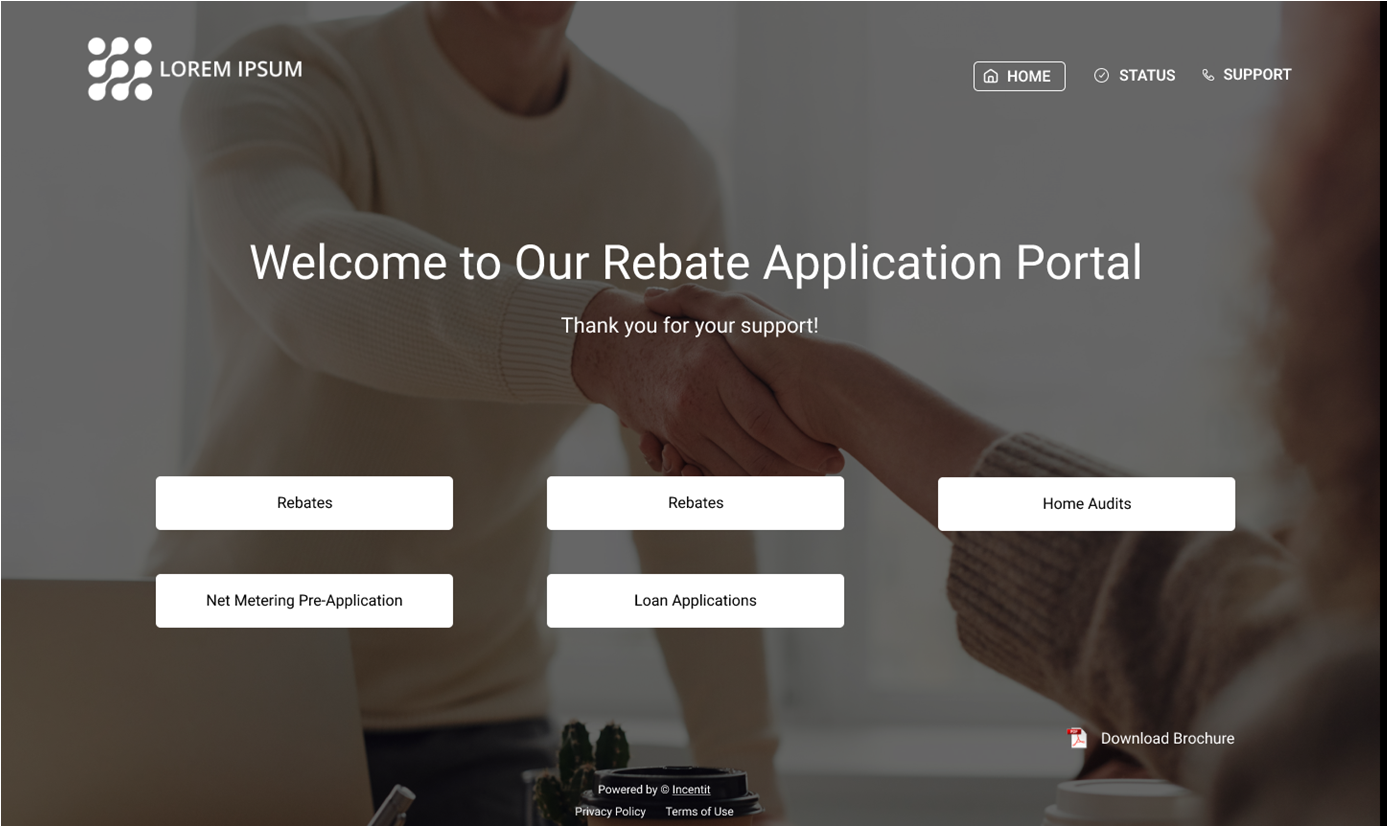
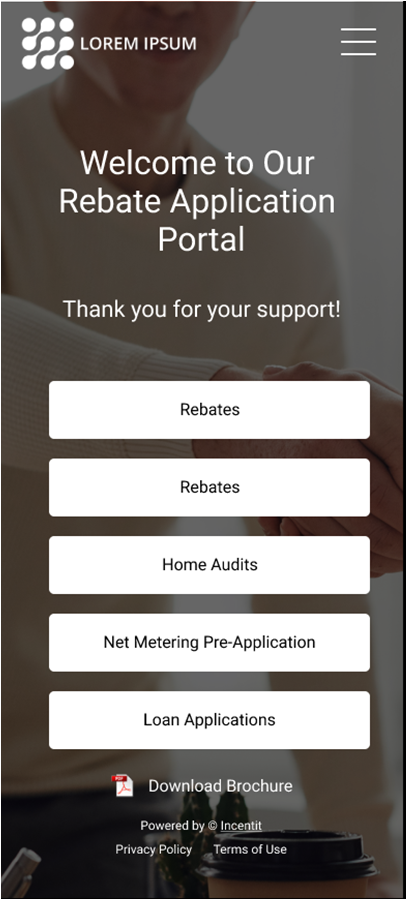
AppCentral helps consumers, homeowners, and building owners complete applications faster with no-code forms, mobile-first UX, status tracking, and AI-ready uploads.
- No-code form and workflow configuration for fast program launches.
- Step-by-step wizard with save-and-resume and clear progress indicators.
- Mobile optimized with camera-based photo capture and document uploads.
- AI-ready uploads with optional OCR data extraction and validation.
- Status lookup, support resources, and automated email updates.
- Optional secure login and registration for repeat applicants.
Book an AppCentral Demo See Portal Features
Portal Features in Detail
Everything applicants need for a smooth, mobile-first application experience.
Step-by-Step Wizard
Guide applicants through the rebate process with a clear, multi-step wizard that breaks complex applications into manageable sections. Each step includes helpful instructions, field validation, and progress indicators. Applicants can save their progress and return later, reducing abandonment rates and support calls.
- Multi-page forms with progress tracking
- Save and resume functionality
- Real-time field validation with helpful error messages
- Contextual help text and tooltips
- Review page before final submission
Mobile Optimized
Over 60% of rebate applications start on mobile devices. AppCentral is built mobile-first with responsive design that adapts to any screen size. Touch-friendly buttons, optimized form fields, and streamlined navigation make it easy to complete applications on phones and tablets without pinching, zooming, or horizontal scrolling.
- Responsive design for all screen sizes
- Touch-optimized interface elements
- Fast loading on cellular networks
- Works offline with automatic sync when reconnected
- Native camera integration for photo uploads
Photo Uploads
Eliminate the need for scanners and fax machines. Applicants use their device camera to capture receipts, invoices, installation photos, and equipment labels directly from the application. Images are automatically compressed and optimized for fast uploads while maintaining readability. Support for multiple file formats including PDF, JPG, PNG, and HEIC.
- Direct camera capture from mobile devices
- Drag-and-drop file upload on desktop
- Automatic image compression and optimization
- Multiple file uploads per application
- Preview uploaded documents before submission
- OCR integration for automatic data extraction (optional)
Smart Forms
Dynamic forms that adapt based on applicant responses. Select a product category and only relevant fields appear. Choose a contractor from the approved list and their information auto-fills. Answer "yes" to homeowner status and additional eligibility questions display. This conditional logic reduces form complexity and ensures applicants only see fields that apply to their situation.
- Conditional field display based on responses
- Auto-fill from approved contractor lists
- Address lookup with auto-complete
- Product catalogs with search and filtering
- Calculated fields for rebate amounts
- Pre-populated data for returning users
Status Tracking
Keep applicants informed with real-time status updates throughout the review and approval process. After submission, applicants receive a confirmation number and can check their application status anytime. Automated email notifications alert them when their application moves to review, requires additional information, is approved, or payment is issued. Reduces "where's my rebate?" support calls by 70%.
- Real-time application status dashboard
- Automated email notifications at each stage
- SMS text alerts (optional)
- Estimated processing time display
- Document request notifications
- Payment confirmation with tracking
Support Page
Comprehensive help resources reduce support calls and improve applicant satisfaction. Searchable FAQ answers common questions about eligibility, required documents, and processing times. Program guidelines and forms are available for download. Contact information with phone, email, and live chat options (if enabled) ensures applicants can get help when needed.
- Searchable FAQ with categorized topics
- Downloadable program guidelines and forms
- Video tutorials and walkthroughs
- Contact information with multiple channels
- Live chat integration (optional)
- Approved contractor directory
Program Catalog
Help applicants discover all available rebates with a browsable program catalog. Filter by category (HVAC, appliances, lighting), property type (residential, commercial), or rebate amount. Each program listing shows eligibility requirements, rebate amounts, required documents, and estimated processing time. Applicants can compare programs and select the best fit before starting their application.
- Browse all available rebate programs
- Filter by category, property type, or amount
- Detailed program descriptions with requirements
- Rebate calculator for estimated amounts
- Program availability dates and deadlines
- Direct link to start application
Address Validation
Automatically verify service territory eligibility based on property address. Integration with utility service maps and geographic boundaries ensures only eligible applicants can apply. Address validation also standardizes addresses for accurate mailing and reduces returned payments. Supports both residential and commercial properties with multi-unit building handling.
- Real-time address verification
- Service territory boundary checking
- USPS address standardization
- Multi-unit building support
- Geolocation for mobile users
- Custom eligibility rules by zip code or region
Document Library
Centralized repository for all program-related documents. Applicants can download program guidelines, application forms, contractor lists, product specifications, and compliance certificates. Documents are organized by program and category with search functionality. Version control ensures applicants always access the most current forms and requirements.
- Organized document repository
- Program guidelines and requirements
- Downloadable application forms
- Approved contractor and vendor lists
- Product specification sheets
- Version control and update notifications
Email Notifications
Automated email communications keep applicants informed throughout the rebate lifecycle. Confirmation emails provide application numbers and next steps. Status update emails notify when applications move to review, approval, or payment. Document request emails specify exactly what's needed with upload links. Payment confirmation emails include check numbers or direct deposit details. All emails are branded with your organization's logo and colors.
- Submission confirmation with application number
- Status change notifications
- Document request alerts with upload links
- Approval and payment confirmations
- Customizable email templates
- Branded with your organization's identity
Multi-Language Support
Reach more customers by offering the portal in multiple languages. Spanish is included by default with additional languages available. Language selector in the header allows users to switch languages at any time. All interface text, help content, and email notifications are translated. Program-specific content can be provided in multiple languages for complete localization.
- Spanish language support included
- Additional languages available (French, Chinese, etc.)
- Language selector in header
- Translated interface and help content
- Multilingual email notifications
- Right-to-left language support
Accessibility Compliance
Built to WCAG 2.1 Level AA standards ensuring all users can access and complete rebate applications. Screen reader compatible with proper ARIA labels and semantic HTML. Keyboard navigation support for users who cannot use a mouse. High contrast mode and adjustable text sizes for users with visual impairments. Meets federal and state accessibility requirements for government-funded programs.
- WCAG 2.1 Level AA compliant
- Screen reader compatible
- Full keyboard navigation
- High contrast mode
- Adjustable text sizes
- Alternative text for all images
Flexible Security Options
Choose the security model that fits your program needs. Open portals require no login—perfect for one-time rebate submissions where convenience is key. Secured portals with user registration allow applicants to track multiple applications and save personal information. SSO integration connects to existing customer portals for seamless authentication. All options include SSL encryption and PCI compliance for payment card data.
- Open Portal: No login required, email-based tracking
- Secured Portal: User registration with password or social login
- SSO Integration: SAML or OAuth connection to existing portals
- SSL encryption for all data transmission
- PCI DSS compliance for payment information
- Two-factor authentication (optional)
Seamless Integration with Incentit Platform
AppCentral is purpose-built to work with the Incentit program management platform. Applications flow directly into Incentit's approval workflows with no manual data entry. Uploaded documents attach automatically to claims. Status updates in Incentit trigger email notifications through AppCentral. Payment confirmations sync back to the portal for applicant tracking. This tight integration eliminates duplicate data entry, reduces processing time, and ensures data consistency across systems.
- Real-time data sync with Incentit platform
- Automatic document attachment to claims
- Bi-directional status updates
- Shared participant database
- Unified reporting across portal and platform
- Single sign-on for program administrators
Make Applications Easy for Your Customers
See how AppCentral can increase participation rates and reduce support costs.
Book an AppCentral Demo Call (515) 650-0086